User guide
Everything the app does, in the order you are likely to meet it. Nothing here describes a button that does not exist yet.
Creating an account
An account is created in the 4 Envelopes mobile app. The browser signs an existing account in and has no sign-up form of its own: the trial starts at registration and the subscription is bought in the app, so there is one place where an account begins.
- An email address and a password of at least six characters — or one button: Google, or Apple on an iPhone.
- A confirmation email follows. You do not have to wait for it: the app is fully usable straight away and nothing is held back until you confirm.
- Signing in with Google or Apple sends no email at all. The provider confirmed the address before we ever saw it.
- The trial is 33 days from the moment the account is made. No card is asked for, and nothing is limited during it.
- When the trial runs out without a subscription the account becomes read-only: every figure stays readable and only entering new ones stops.
Signing in
The same account signs in from the browser and from the app. The data lives on the server, so the two are always looking at the same figures rather than at two copies.
- Email and password, or the same provider button the account was created with.
- Forgotten the password: ask for a link on the sign-in screen. It is good for one hour.
- Opening that link sets the new password, confirms the address at the same time, and closes every other session — a reset is what people do when they think somebody else is in.
- The answer to a reset request is the same whatever you type, so that screen tells nobody whether an address has an account behind it.
- An account made with Google or Apple has no password to reset. Asking for one gets a message naming the button to press instead.
Currencies
One base currency, in which every total, envelope and report is expressed, and thirty-four currencies to denominate accounts and payments in. Both live in Settings.
- Rates download on their own. RUB, KZT, GEL and AED are not quoted by the source and fall back to a stored table — they are marked, so you can see which kind of figure you are reading.
- Any rate can be set by hand. A manual rate survives a refresh and stays until you clear it.
- A currency you do not use can be switched off. That only shortens the dropdowns: balances, history, envelopes and reports are untouched, and an account already denominated in it keeps working.
- The base currency cannot be switched off — everything is expressed in it. Changing it re-expresses every rate rather than throwing your manual ones away.
- The order of the list is yours: drag a row in the browser, or use the arrows in the app.
Accounts
An account is a name, a currency and an opening balance. Its balance is that opening figure plus everything booked against it since.
- A payment, a receipt or a transfer always moves an account in that account’s own currency, whatever currency the amount was entered in.
- A transfer between accounts in different currencies asks for the amount actually credited rather than a rate — the figure the statement gives. The rate is worked out from the two amounts, so there is no argument about which way it points.
- An account can be switched off. It leaves the dropdowns and stays in every total: its balance still counts, its history stays, and a recurring rule pointing at it still confirms.
- The order is yours here too, and the payment form opens on the account you last paid from.
- Deleting asks first and names what is going.
Recurring payments and receipts
A rule is a plan, not a charge. It says what is expected, how often and from which account; nothing reaches the ledger until an occurrence is confirmed.
- Weekly, monthly or yearly, with the day named explicitly: a weekday, a day of the month, or a day and a month.
- "The 31st" works in February as well — it clamps to the last day of a short month.
- A start date bounds it, so a rule does not appear on the calendar before it begins.
- A rule may be denominated in any supported currency, whatever its account is. Nothing is converted until an occurrence is confirmed, and then at the rate in force at that moment.
- A rule can be switched off without being deleted: it stops producing occurrences and keeps everything it has already produced.
Goals
A goal is a name, an amount, a currency and a date to have it by. From those it works out what to set aside each month between now and then.
- Progress is what has been moved into the goal measured against its target.
- Money is contributed from an account, and the contribution is an ordinary ledger row you can see on the transactions screen.
- The envelopes hold back what each unfinished goal still needs this month — the monthly suggestion less whatever has already gone in, so a goal you have already fed this month is not charged for twice.
- The envelopes screen reminds you about goals that have had nothing set aside since the 1st. A contribution dated in a past month does not silence it.
- A goal can be switched off, and a finished one stops being counted.
The four envelopes
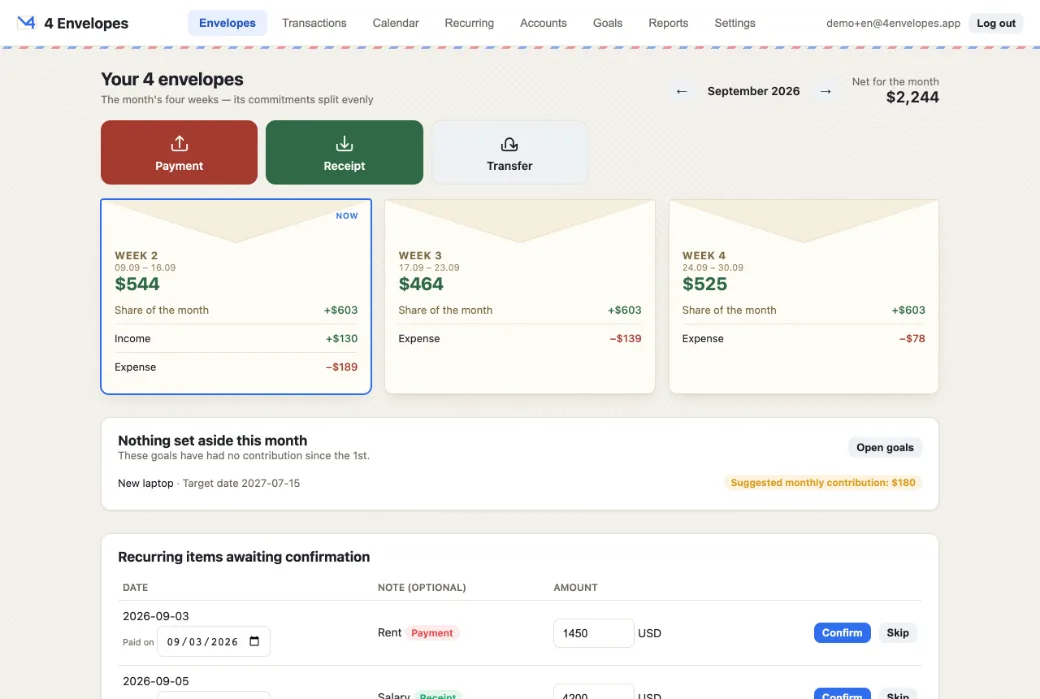
The first screen, and the one the app is named after. The calendar month is divided into four, and each envelope says what is left to spend in its own part of it.
- An envelope is the month’s standing commitments divided by four, plus whatever you entered yourself for that week.
- Standing commitments are the month’s planned income less its planned expenses less what the goals still need this month. That half is deliberately the same number in all four envelopes: it is one figure split four ways.
- The weeks are quarters of the calendar month rather than seven-day blocks. The first begins on the 1st, the last ends on the last day, and every date in the month falls in exactly one of them.
- Weeks you have already lived through are not shown — an envelope is what is left to spend. Paging back to another month shows all four, because "already past" means nothing in a month you are only looking at.
- A week spent into the red is shown as empty and what it was short is pushed onto the weeks after it, never the ones before, whose money is already being spent. The card says when that has happened.
- Each card prints its own arithmetic: its share of the month, that week’s income and expenses, and anything carried between weeks.
- The month’s standing commitments are listed once, beside the figure they produce, rather than inside a card — their money is spread over all four.
Confirming a planned payment
A rule produces occurrences; confirming one is what turns it into money that has actually moved. The list sits on the envelopes screen.
- It runs from the 1st of the month to the end of the week you are standing in. Something due in three weeks is not something to confirm today; something overdue from the 1st still is, and there is nowhere else to book it.
- The amount is editable and comes filled in with the rule’s own. A bill is rarely the plan to the penny — the ledger row carries what was actually paid and the rule keeps its figure for the months after it.
- The date is editable too, filled in with the day it was due, and it has to stay inside that occurrence’s own month. Booking August’s rent in September would misstate both months, so it is refused with a reason rather than quietly accepted.
- An occurrence can be skipped instead of confirmed — the month it belongs to simply does not get one.
- Confirming the same occurrence twice is not possible. A second attempt is refused rather than booked, so a double tap cannot become a double payment.
- A confirmed occurrence is still a planned item. It does not jump out of the shared monthly figure into the single week it happens to be dated in.
Payments and receipts
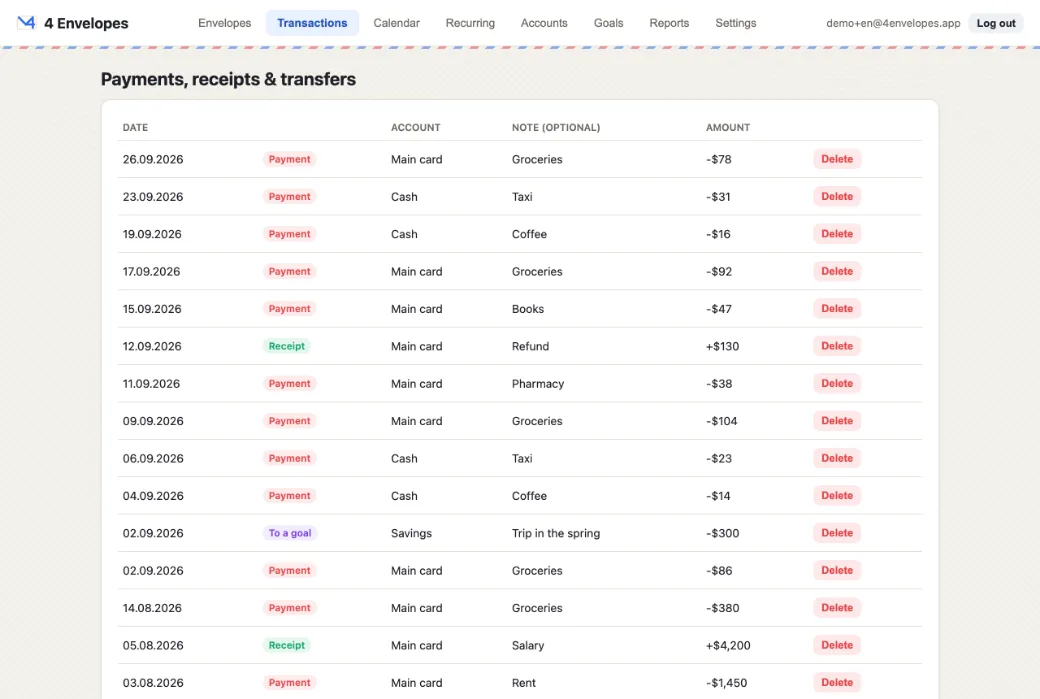
Three buttons at the top of the first screen — payment, receipt, transfer. Each opens a window over the page: an amount, an account, a note and a date, and a currency if it is not the account’s own.
- The window closes when the entry is booked and stays open when it is refused, with what you typed still in it — one that closed on a refusal would throw the entry away and leave the message explaining a form nobody can see.
- Paying in another currency: enter the figure on the bill, and beside it what the account was actually charged. Both are kept — the ledger shows the 9 000 THB and the $250 it cost.
- Transfers move money between your own accounts, so they are left out of income and expense totals; counting them would count every internal movement twice.
- The transactions screen lists everything and can be narrowed to one account. A transfer appears there from that account’s side, so money arriving reads as arriving rather than as the other account’s outgoing.
- Deleting asks first and names the row.
- In the app the form can also be filled in by photographing a receipt or by pasting a bank’s message. Nothing is ever booked automatically: the form opens filled in, and you press the button.
Calendar
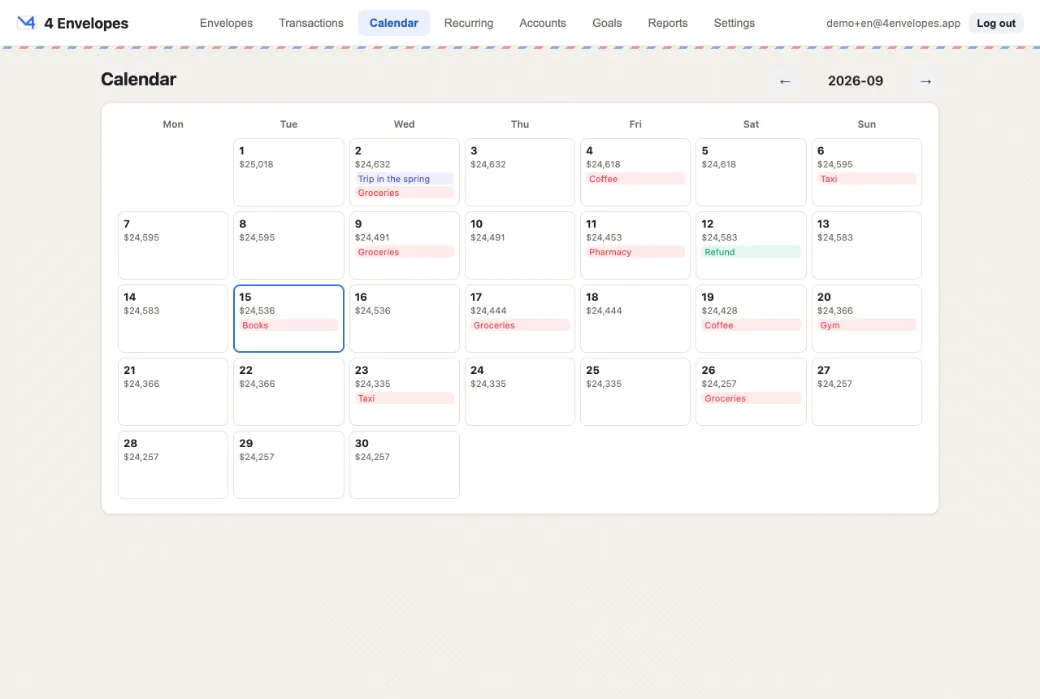
Every day of the month with what falls on it and the balance after it.
- Behind today the figures are reconstructed from what was actually booked; ahead of it, planned items are projected forward.
- An unconfirmed occurrence from a past day is deliberately not drawn here — the balance printed beside it would be denying it. It is still waiting on the envelopes screen.
- Across all accounts the balance is converted into the base currency, because a single figure has to be in one money.
- Narrowed to one account it is in that account’s own currency, and it matches the figure on the accounts screen exactly.
- Transfers cancel out across all accounts and are left out of the running balance. Inside one account they are the balance moving, so there they count.
Reports
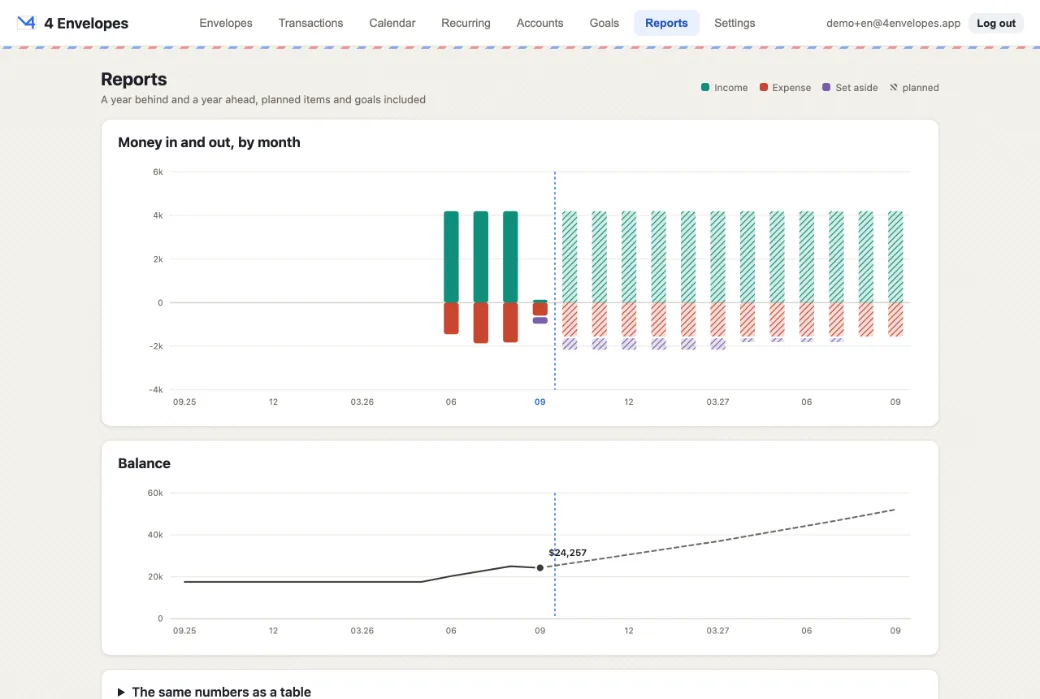
Two charts, a year back and a year ahead: money per month, and the balance.
- They are two frames on a shared timeline rather than one chart with two scales. Money per month is a flow and a balance is a stock; putting them on one pair of axes lets whoever drew it decide which line looks higher.
- Behind today the series are built from booked rows only. Ahead of it they are built from plans: unconfirmed occurrences, one-time rows already dated ahead, and what each goal still needs.
- Planned months are drawn in the same colours, hatched, so the join between the two is visible.
- Transfers are excluded on both sides, for the same reason they are left out of the totals.